Designing a Review Queue for Revenue Risk Support Messages
Support inboxes hide business risk in plain sight.
A customer opening a support request due to "the copy button is broken" isn't the same kind of problem as a paid customer saying "we paid the invoice but our account is locked." Both are support messages but only one suggests a possible billing or entitlement failure.
I built Revenue Risk Inbox to test a specific product question: what would a support queue look like if it separated low-priority messages from cases that might affect payment, access, renewal confidence or churn?
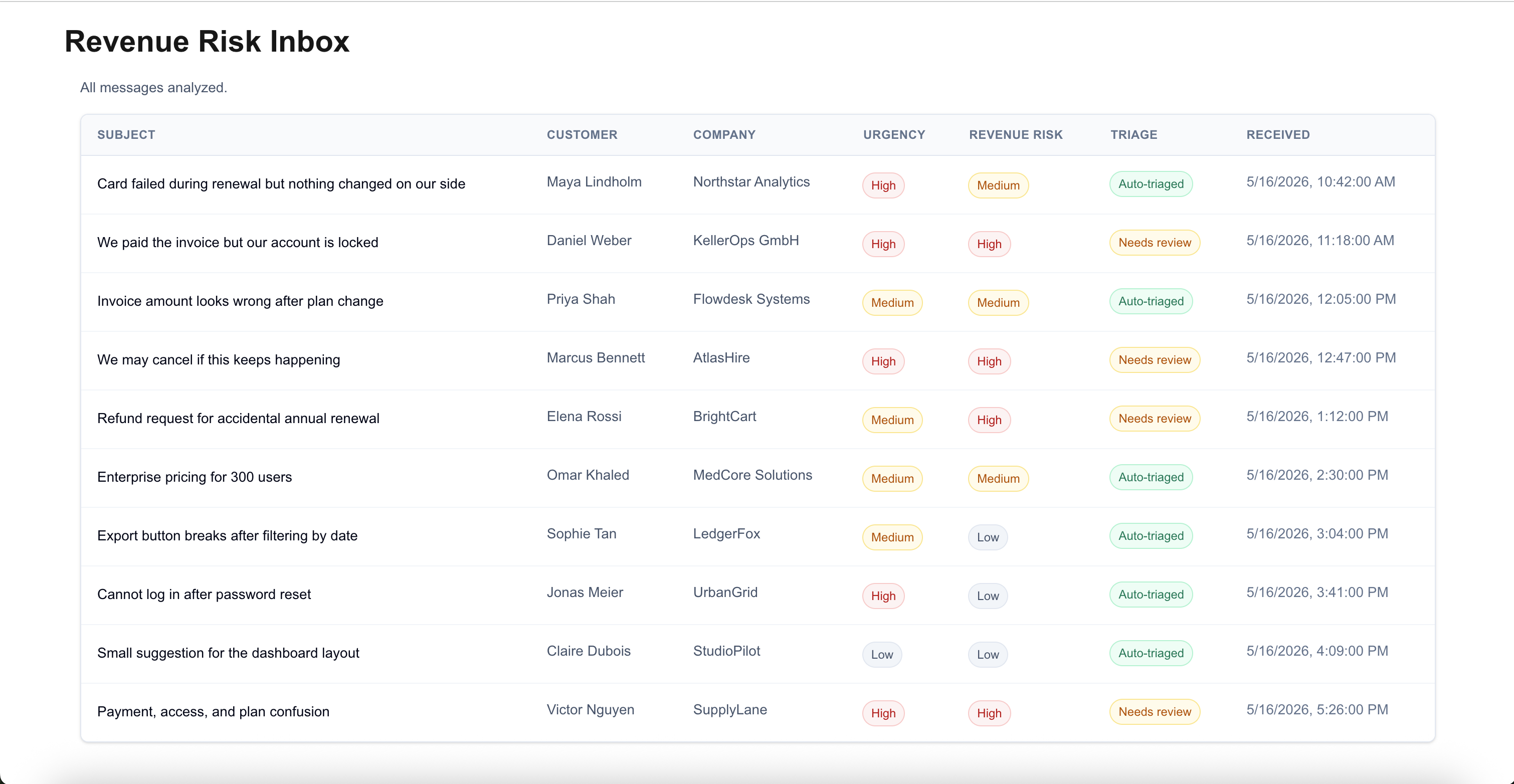
The problem
A support inbox usually flattens different kinds of work into the same row pattern: subject, customer, company, received time.
That works until the inbox contains a mix of failed payments, paid accounts locked out of the product, invoice disputes, cancellation threats, product bugs and low-risk feedback.
Those messages shouldn't be reviewed with the same urgency or be automated blindly.
The main point wasn't whether AI can summarize the message. It was whether the interface can help a reviewer see which messages carry revenue risk, why the AI thinks so and where human review is still required.
The workflow
Revenue Risk Inbox models a small support-ops workflow.
A reviewer loads a batch of support messages, runs analysis, then scans the inbox by urgency, revenue risk, category and triage status. Opening a message shows the original customer request along with the AI summary, evidence and recommended next step.
The AI contract
The app sends support requests to a server-side API route and expects one structured analysis per message.
{
  id: string;
  customerName: string;
  companyName: string;
  receivedAt: string;
  subject: string;
  body: string;
}
The AI response is validated with a Zod schema. Each analysis must include:
{
  messageId: string;
  urgency: "low" | "medium" | "high";
  revenueRisk: "low" | "medium" | "high";
  summary: string;
  recommendedAction: string;
  evidence: string[];
  confidence: number;
  needsHumanReview: boolean;
  category:
    | "failed_payment"
    | "invoice_issue"
    | "plan_access"
    | "cancellation_risk"
    | "refund_request"
    | "enterprise_sales"
    | "product_bug"
    | "account_issue"
    | "product_feedback"
    | "other";
}
For v0, I kept the human-review rule simple. A message requires human review when the case involves high revenue risk, payment/access mismatch, refund policy, cancellation risk or low confidence. The AI can recommend a next step but it doesn't resolve billing, access or refund issues.
The subtle bug: valid output can still be wrong
Structured output validates shape but this isn't enough here.
Zod can tell me that the response contains a messageId, urgency, revenueRisk, summary and recommendedAction. It can't tell me whether the right analysis was attached to the right customer message.
This matters because the model returns an array. Even if every item in that array is valid, the relationship can still be wrong: the order can change, an ID can be duplicated, one message can be missing or an analysis can refer to a message that was never sent.
In a revenue risk workflow, this is not a harmless bug. A failed-payment analysis could be attached to a product-feedback message. A paid-but-locked-out customer could be treated as low priority. The dangerous part is that the UI can still look fine.
This is why the app doesn't rely on array order. Each analysis must return the original messageId and the app maps analyses back to support requests by ID. The matching logic rejects duplicate IDs, missing analyses, count mismatches and unknown message IDs.
Making the AI output inspectable
The details side panel compares the original customer message with the AI review.
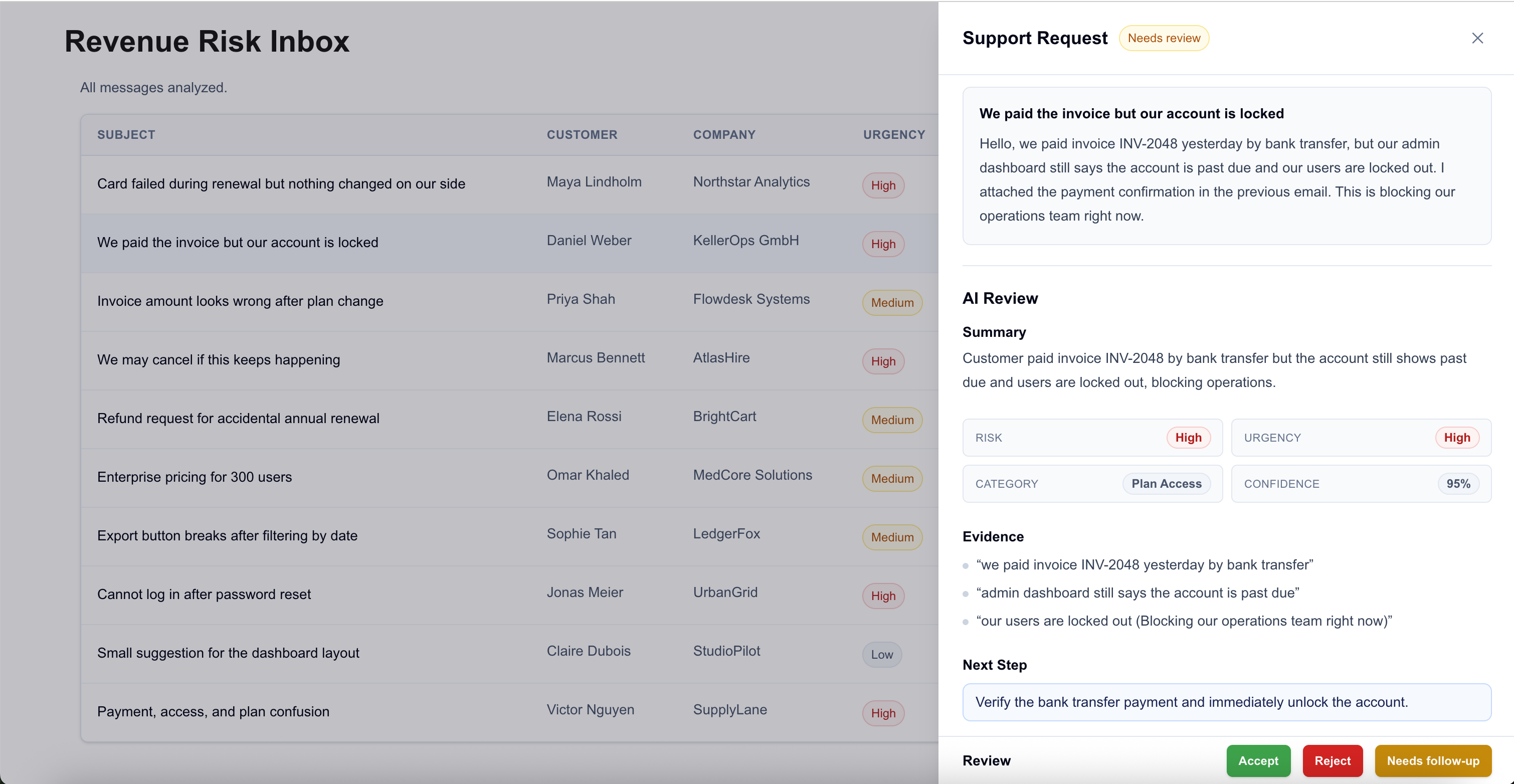
The panel is where the reviewer checks the AI output against the original message. It shows the original customer request next to the AI summary, risk labels, evidence snippets and recommended next step. For cases marked as needing review, it also shows review actions.
Evidence is what keeps the label reviewable. In the paid-but-locked-out case, the reviewer can see the snippets that caused the escalation: "we paid invoice INV-2048", "the account is past due" and "our users are locked out." The reviewer doesn't have to trust the label blindly. They can compare the AI output against the customer's words before deciding what to do next.
The triage model
This is the original artifact for the project: the working revenue risk triage matrix.
| Message type | Revenue risk | Urgency | Human review? | Why |
|---|---|---|---|---|
| Failed renewal payment | High | High | Yes | Payment collection and account continuity are at risk. |
| Paid account locked out | High | High | Yes | The customer has paid but cannot use the product. |
| Invoice amount dispute | Medium | Medium | Sometimes | Billing confusion can delay payment or create support escalation. |
| Cancellation threat | High | High | Yes | The customer is explicitly signaling churn risk. |
| Refund request | High | Medium | Yes | The response can affect revenue and policy consistency. |
| Enterprise pricing request | Medium | Medium | No | Commercially important, but usually a routing case. |
| Product bug affecting paid work | Medium | Medium | Sometimes | Product impact may affect renewal confidence. |
| Login issue unrelated to billing | Low | High | No | Urgent for the user, but not necessarily revenue risk. |
| Product feedback | Low | Low | No | Useful signal, but not an immediate support-risk case. |
| Mixed payment/access confusion | High | High | Yes | Billing and entitlement state may be inconsistent. |
The matrix is simple on purpose. A more complex version could include contract value, customer tier, renewal date, account owner or payment history.
For v0, that would be too much. The goal was to prove the review pattern, not build a production support platform.
The test cases
The demo uses 10 realistic support messages.
| Case | Input signal | Expected AI behavior | Human review concern |
|---|---|---|---|
| Failed payment | Card renewal failed, customer says card is valid | High urgency, high revenue risk | Do not assume the card is invalid. |
| Paid but locked out | Bank transfer paid, account still past due | High urgency, high revenue risk | Verify payment before restoring access. |
| Invoice dispute | Invoice amount changed after plan change | Medium urgency, medium revenue risk | Avoid promising a refund before review. |
| Cancellation threat | Customer says they may cancel if issue continues | High urgency, high revenue risk | Escalate before churn. |
| Refund request | Accidental annual renewal | Medium urgency, high revenue risk | Apply refund policy consistently. |
| Enterprise pricing | 300-user expansion, SSO, audit logs | Medium urgency, medium revenue risk | Route to sales quickly. |
| Product bug | Export button broken after filtering | Medium urgency, low/medium revenue risk | Determine whether paid workflow is blocked. |
| Login issue | Password reset completed, still cannot log in | High urgency, low revenue risk | Do not confuse account access with billing access. |
| Product feedback | Dashboard should remember selected date range | Low urgency, low revenue risk | Auto-triage as feedback. |
| Mixed payment/access confusion | Payment, access and plan state are unclear | High urgency, high revenue risk | Needs human review because multiple categories overlap. |
Designing the review workflow
The main interface is built for comparison.
A support reviewer doesn't only need to understand one message. They need to decide which messages require attention first. That makes the queue itself part of the product: urgency, revenue risk, category, triage status and received time need to be visible side by side.
This is why the main screen uses a table. In this workflow, density isn't a flaw. It is what lets the reviewer scan for the cases that might affect payment, access, renewal confidence or churn.
I also kept urgency separate from revenue risk because they can diverge. A login issue can be urgent without being a direct revenue-risk case. An enterprise pricing request may be commercially important without being an emergency. If both signals collapse into one generic priority label, the reviewer loses useful information.
The low-risk cases matter for the same reason. A triage system that marks everything as important is useless; it just creates more pressure without added benefit.
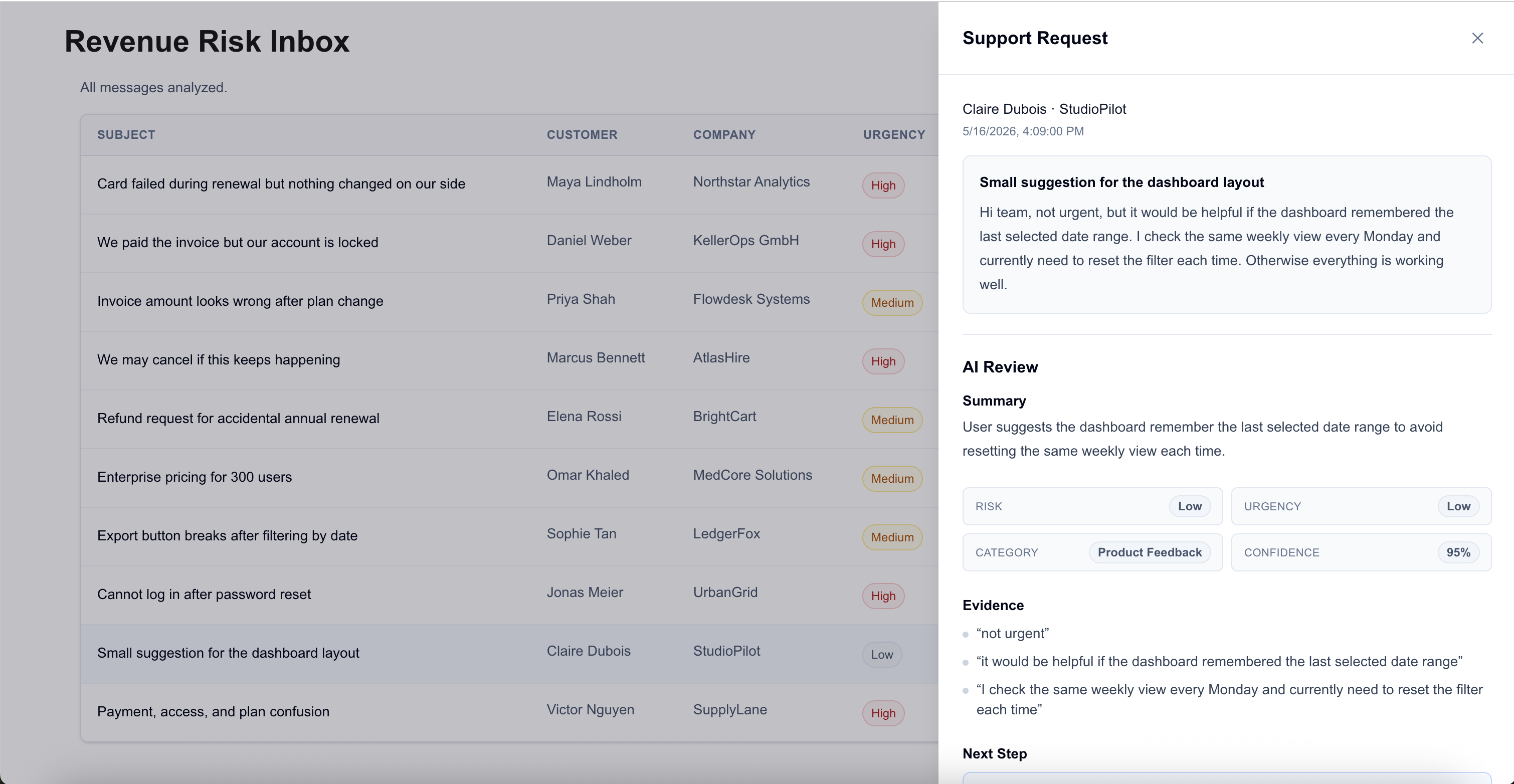
The interface isn't trying to make the AI output feel authoritative. It is trying to make the output comparable, inspectable and easy to challenge.
States and failure cases
The UI accounts for:
- not-analyzed messages
- active analysis
- partially analyzed batches
- auto-triaged messages
- messages that need review
The validation layer accounts for:
- malformed AI output
- missing analyses
- duplicated message IDs
- count mismatches
- unknown message IDs
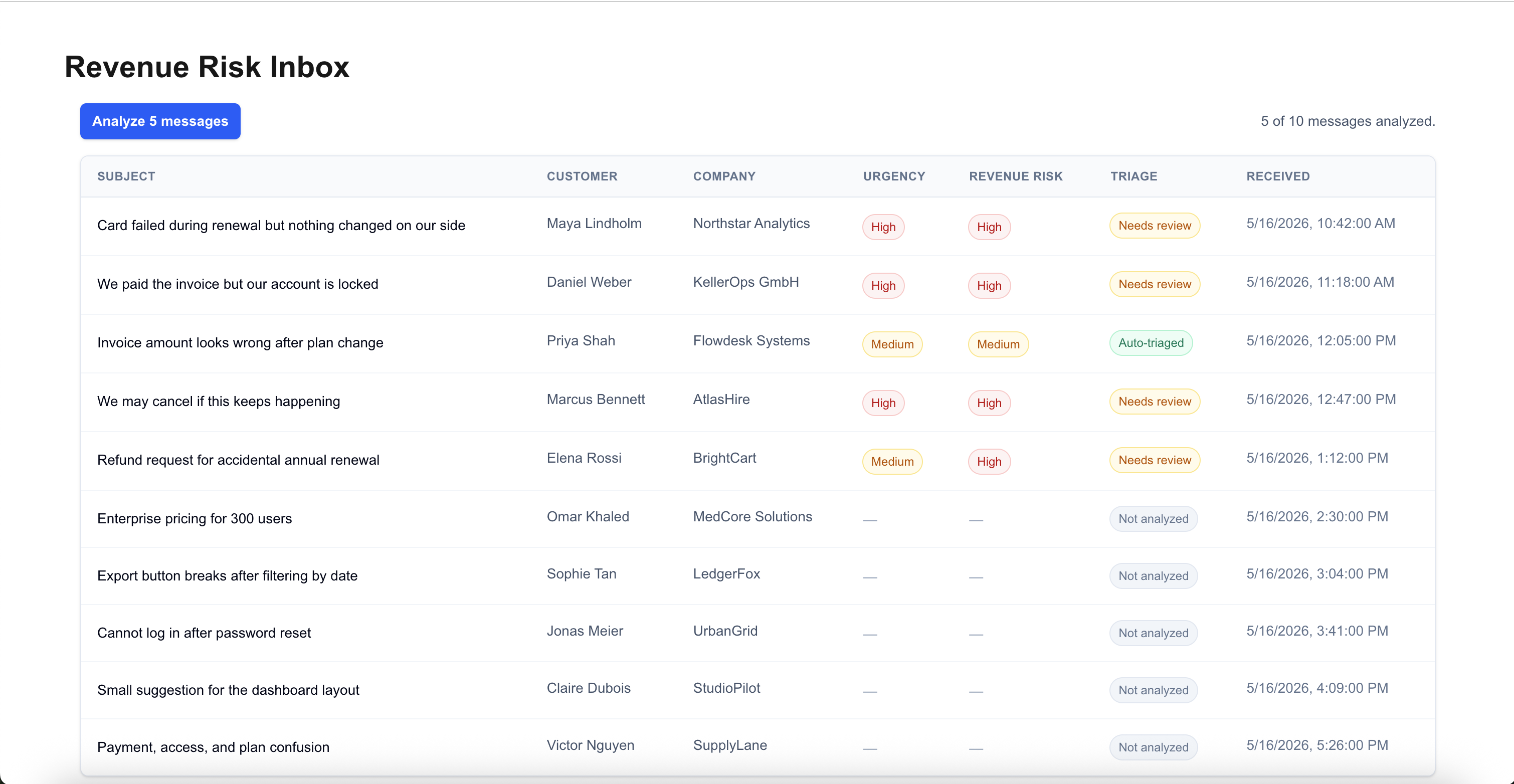
That matters because a review queue shouldn't assume the model response is complete, correctly ordered or safe to trust.
Where this leaves the project
This version doesn't include authentication, persistence, helpdesk integrations, billing mutations, assignment flows, audit logs, analytics or real customer data.
That was intentional since those features would make the demo larger but they wouldn't change the core interaction I wanted to test.
The next layer would be evaluation: expected vs. actual urgency, revenue risk and category; ambiguous cases; prompt regressions; and reviewer overrides.
That would move the project from "can the model produce plausible triage?" to "how do we know this triage behavior is reliable enough to put in front of a reviewer?"