Designing a UI QA Inspector That Separates Screenshot Evidence from DOM Evidence
I built a small AI-assisted UI QA inspector around a simple question: if I give a model a screenshot of a UI state and the relevant DOM snippet, can it draft useful QA findings for frontend engineers?
My goal wasn't to build a production accessibility scanner or replace tools like axe, Lighthouse, browser accessibility inspection, manual QA or design review. I wanted to test one narrow workflow: can AI help turn UI evidence into structured frontend feedback?
The short answer is yes but only with constraints. The model can draft useful findings, especially when the screenshot and DOM evidence clearly point to the same problem. However, this project exposed an interesting problem: the model would often mix up what was visible in the screenshot with what was only knowable from the DOM. Improving the evidence model ended up being my main focus.
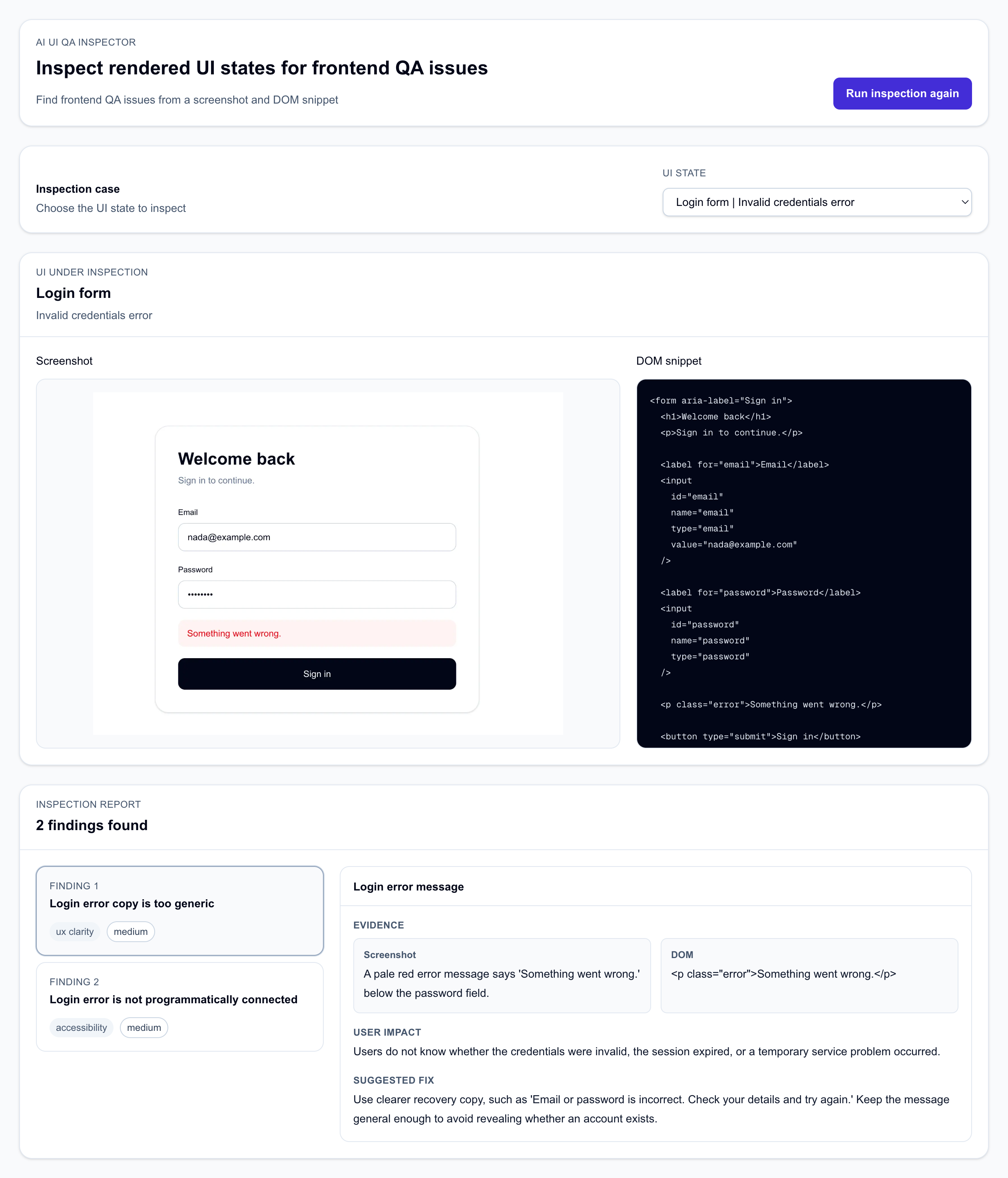
The basic flow
The app has 10 sample UI states documented in the sample cases. Each case has a screenshot, a DOM snippet and a reviewed mock AI inspection result. There is also a live AI mode that can be enabled and tested locally using the mock and live AI mode setup.
The output is a structured QA report. Each finding includes a title, issue type, severity, affected element, visual observation, DOM evidence, user impact and suggested frontend fix.
The first real problem was evidence mixing
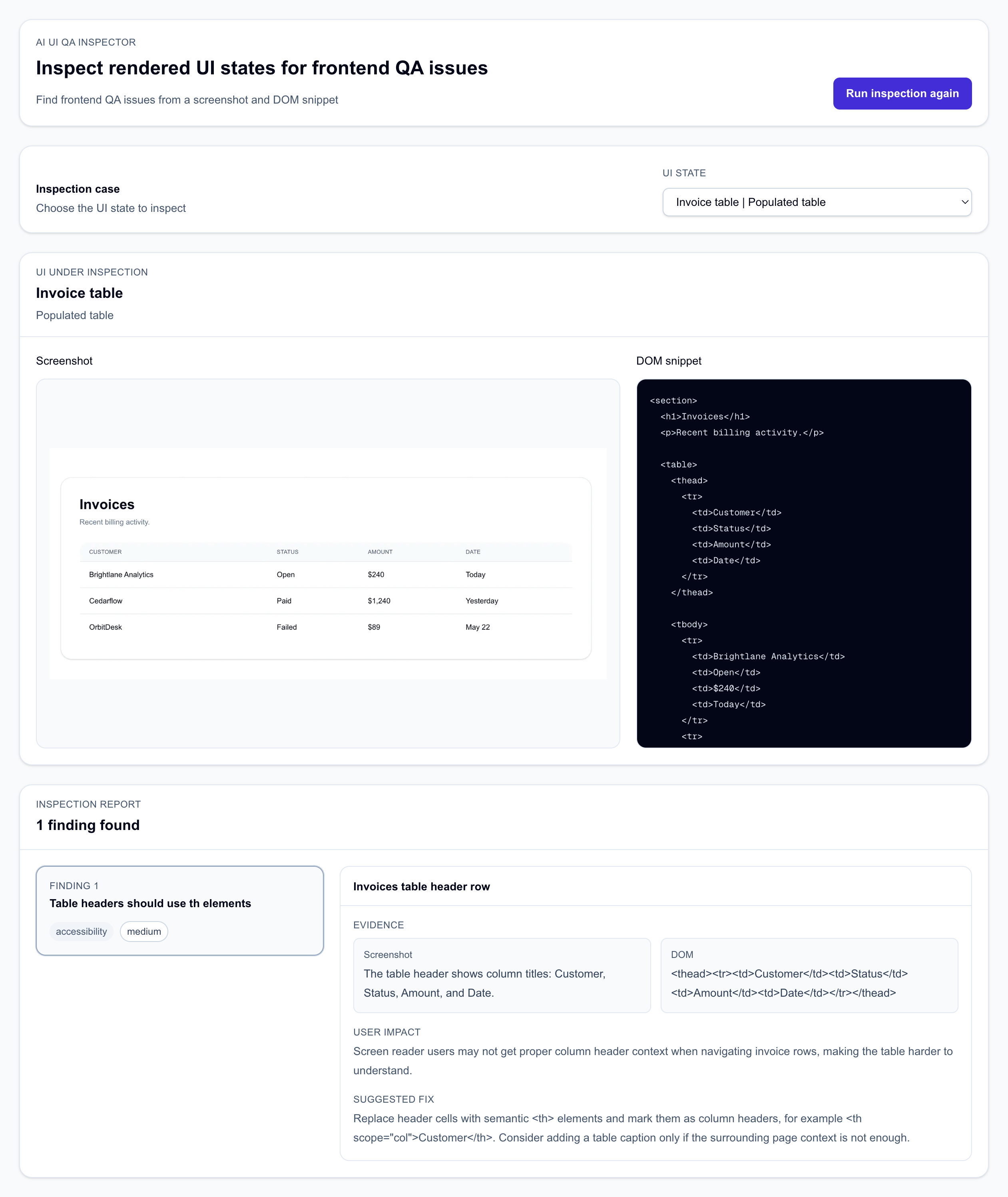
One of the cases was an invoice table. Visually, the table looked normal. It had columns for Customer, Status, Amount, and Date. The DOM showed the actual issue: the table header row used td cells instead of th cells.
<thead>
  <tr>
    <td>Customer</td>
    <td>Status</td>
    <td>Amount</td>
    <td>Date</td>
  </tr>
</thead>
The model correctly identified the issue by saying that the table headers should use semantic header cells. However, the problem was the evidence field. In an early version, the model wrote something like: “The header row contains td elements instead of th elements” as the visual observation.
This can't be true. A screenshot can't show whether an element is a td or a th. The screenshot can show that the top row visually acts as a header row. The DOM proves whether it is implemented correctly. The correct evidence split is more like this:
visualObservation: 'The table header shows column titles: Customer, Status, Amount, and Date.'

domEvidence: '<thead><tr><td>Customer</td><td>Status</td><td>Amount</td><td>Date</td></tr></thead>'
This small observation ended up taking a few iterations to reach a better way to handle it. The focus shifted from “can I get the model to return the findings from a screenshot + DOM snippet?” to “can I trust what each field actually means?”
Screenshot evidence is not DOM evidence
I ended up making the evidence split explicit. visualObservation is only for facts visible in the screenshot. It can describe visible text, layout, controls, error messages, hierarchy, state, modals, menus, tables, toasts, and steppers. It should not describe implementation details.
For example, this is a good visual observation:
The account control shows initials, a user name, and a chevron.
This is not:
The account trigger is a div with no button semantics.
The first sentence is visible in the screenshot. The second sentence depends on the DOM. For that account menu case, the DOM evidence looked like this:
<div class="account-trigger">
  <span class="avatar">NS</span>
  <span>Nada Sadek</span>
  <span>⌄</span>
</div>
That fragment supports the finding that the dropdown trigger should probably be a native button. The screenshot tells us what the user sees. The DOM tells us how it is built. Both matter but they are not interchangeable.
Prompting helped but not enough
I added prompt rules to make the constraint clearer. The model was told that visualObservation must only describe visible UI details from the screenshot and must not mention HTML tags, DOM nodes, ARIA attributes, CSS classes, roles, ids, input types, event behavior, keyboard behavior, screen readers or whether something is announced.
That improved the output but it did not fully solve the problem. The model still occasionally leaked DOM facts into the visual observation field. That made sense in hindsight. The model was trying to produce a coherent finding and it had both screenshot and DOM context available. Without validation, it could still put the right fact in the wrong field.
So I added a small evidence validation layer. The normal Zod schema catches missing fields, invalid issue types, invalid severity values, and malformed results. But it will happily accept this:
visualObservation: 'The toast has no aria-live attribute.'
That is a valid string but it is bad evidence. A screenshot cannot prove whether a toast has aria-live. The evidence validator checks for implementation terms inside visualObservation, such as DOM, ARIA, role, div, span, td, th, screen reader, keyboard, and announcement-related wording. It is not perfect but it catches the failure mode I kept seeing.
One caveat: I used openai/gpt-5-nano for this version. Some of the weaker outputs were probably related to that model choice. A stronger model would likely follow the evidence rules more consistently, produce cleaner titles and avoid some of the weaker findings. However, I don't think model choice removes the need for the evidence contract. If an AI tool is producing developer-facing QA findings, I still want the output to separate screenshot evidence from DOM evidence and I still want validation to be on the safe side. Better models may reduce the number of mistakes but they don't remove the need to define what a trustworthy finding means.
The model was useful but not magical
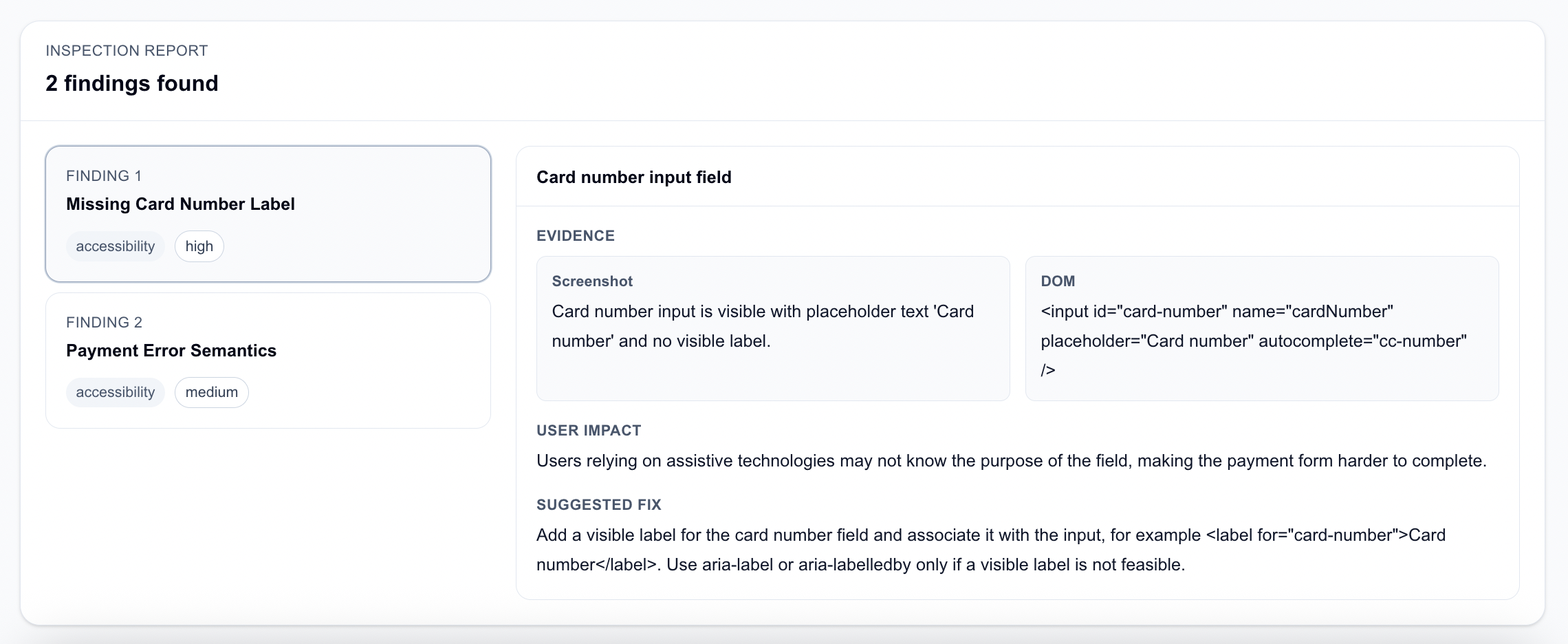
Some cases worked well. In the checkout payment error case, the screenshot showed a card number field with placeholder text and no visible label. The DOM confirmed that the input had no associated label.
<input
  id="card-number"
  name="cardNumber"
  placeholder="Card number"
  autocomplete="cc-number"
/>
The model produced a useful finding about the missing label and suggested adding a visible <label> associated with the input. This is exactly the kind of result I wanted from this project: evidence-backed, specific, and actionable.
The account dropdown case also worked well. The screenshot showed a dropdown trigger with initials, a user name and a chevron. The DOM showed it was built as a div, not a button. The model suggested using a native button with aria-expanded and aria-controls which was a reasonable frontend fix.
The onboarding stepper case was another good one. The DOM had a current step marked only with a class:
<ol class="stepper">
  <li>Account</li>
  <li class="current">Team</li>
  <li>Billing</li>
  <li>Finish</li>
</ol>
The model suggested exposing the current step with aria-current="step". That was a useful finding because the visual state and DOM state supported the same issue.
The pricing card case was a mix of good and not-so-good findings. I wanted the model to notice that the “Popular” plan was not visually prominent enough. It did find some helpful issues but it also tried to create weak accessibility findings around a static badge which wasn't useful. A span with visible text isn't automatically an accessibility issue. This is where human review is still needed.
What I would improve next
This v0 is still basic. The biggest improvement would be to stop maintaining screenshots and DOM snippets separately. A better version would render fixture pages in the browser, capture screenshots from those pages, extract the relevant DOM from the rendered output and then run the AI inspection on that generated evidence package. That would reduce drift between the fixture code, screenshot and DOM snippet.
I would also add automated accessibility findings as an optional input. Not as the whole product but as one more evidence source. The inspection input could become screenshot plus DOM snippet plus optional automated accessibility findings. Then the model wouldn't need to guess deterministic accessibility issues. It could focus more on explaining impact and suggesting frontend fixes.
I would also like to add an evaluation layer. Each case could define expected issue themes and the app could compare live AI output against those themes. That would make it easier to see where the model is useful, where it over-infers and where the prompt or evidence package needs improvement.
What I learned
For AI-assisted frontend QA, the prompt is only one piece. The bigger issue is designing the evidence package and validation around the model. Otherwise, you get confident-looking output that mixes up what the screenshot shows, what the DOM proves and what the model assumes.
I had to decide what counts as visual evidence, what counts as DOM evidence, when the model is over-inferring, which findings are actually worth showing and how to reject output that is valid JSON but bad QA.
The project gave me a clearer direction: AI can help draft frontend QA findings but the findings only become useful when they are tied to accurate evidence and reviewed before being treated as trustworthy.